> ## Documentation Index
> Fetch the complete documentation index at: https://docs.getnativeflow.com/llms.txt
> Use this file to discover all available pages before exploring further.
# Generated App Architecture
> From Foundation to Runtime
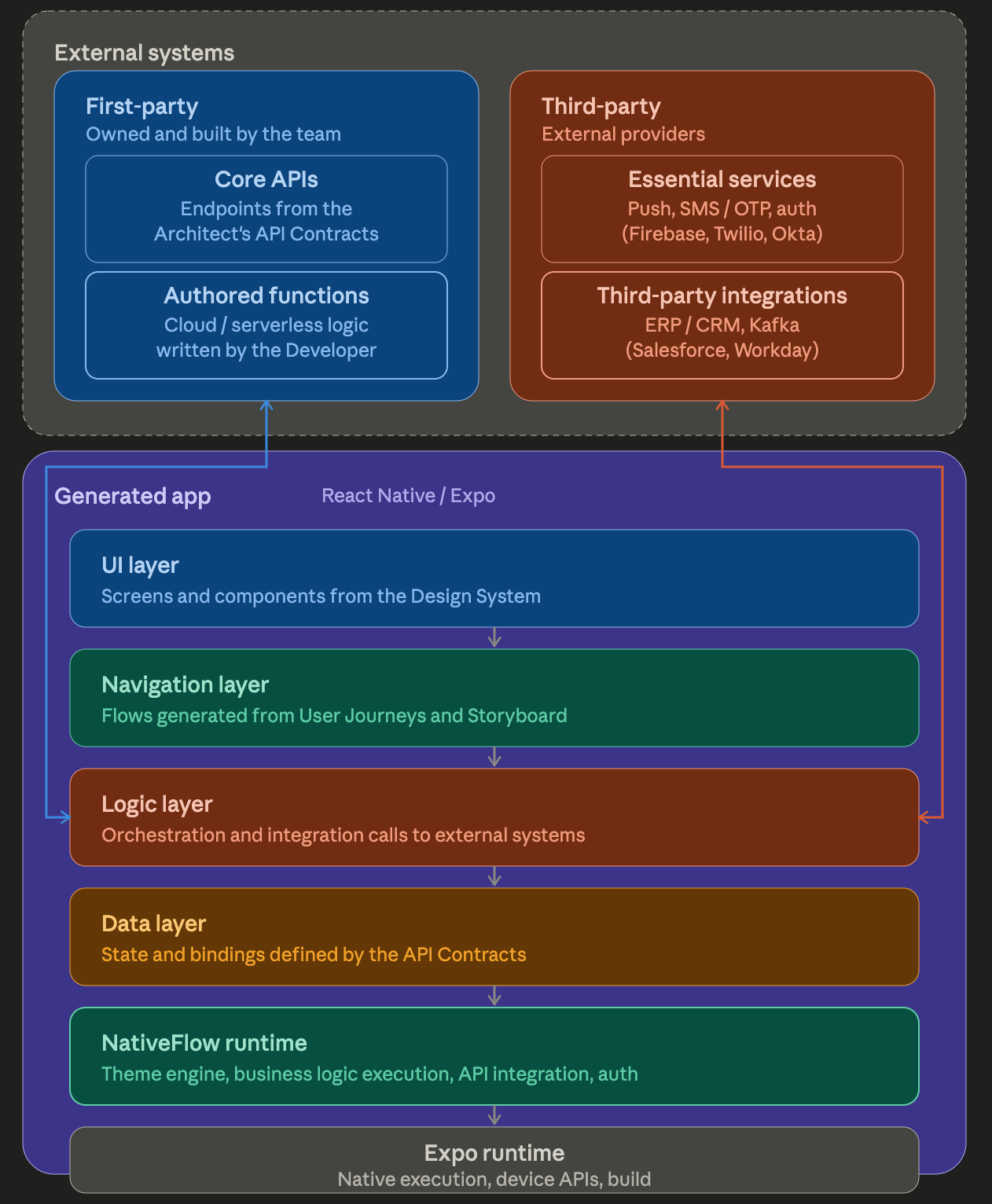 Every app NativeFlow Studio produces is a React Native application built on Expo. The architecture has four layers, each tracing back to a specific Foundation artifact reviewed and approved in the Studio:
* **UI layer**: screens and components rendered from the Design System.
* **Navigation layer**: screen flows generated from the User Journeys and Storyboard.
* **Logic layer**: orchestration and integration calls to external systems, based on the Developer's API Orchestration and Function definitions.
* **Data layer**: state and bindings defined by the Architect's API Contracts.
These layers run on the **NativeFlow runtime**, which handles the theme engine, business logic execution, API integration, and authentication. The NativeFlow runtime in turn runs on the **React Native runtime**, which handles native execution and device APIs using Expo tooling.
The Logic layer connects outward to two categories of external systems:
* **First-party**: Core APIs (from the Architect's API Contracts) and Authored Functions (cloud or serverless logic written by the Developer).
* **Third-party**: Essential Services (push, SMS/OTP, authentication providers like Firebase, Twilio, Okta) and Third-Party Integrations (ERP/CRM systems like Salesforce and Workday, messaging systems like Kafka).
Every app NativeFlow Studio produces is a React Native application built on Expo. The architecture has four layers, each tracing back to a specific Foundation artifact reviewed and approved in the Studio:
* **UI layer**: screens and components rendered from the Design System.
* **Navigation layer**: screen flows generated from the User Journeys and Storyboard.
* **Logic layer**: orchestration and integration calls to external systems, based on the Developer's API Orchestration and Function definitions.
* **Data layer**: state and bindings defined by the Architect's API Contracts.
These layers run on the **NativeFlow runtime**, which handles the theme engine, business logic execution, API integration, and authentication. The NativeFlow runtime in turn runs on the **React Native runtime**, which handles native execution and device APIs using Expo tooling.
The Logic layer connects outward to two categories of external systems:
* **First-party**: Core APIs (from the Architect's API Contracts) and Authored Functions (cloud or serverless logic written by the Developer).
* **Third-party**: Essential Services (push, SMS/OTP, authentication providers like Firebase, Twilio, Okta) and Third-Party Integrations (ERP/CRM systems like Salesforce and Workday, messaging systems like Kafka).